.png)
.png)
.png)


Imagine a member calls and asks, “Does my plan cover MRIs? What is going to be my out-of-pocket?”
The answer to this question is contained in the plan documents – the Summary of Benefits Coverage (SBC) or the Summary Plan Description (SPD) designed into seems like a question and it just the customer service agent’s task to search for this benefit in the plan documents, review it, and explain it to the member in easy-to-understand language.
This is exactly where a real-time Agent Assist AI or Co-pilot can help. Placing the right information with links to “the-source-of-truth” so that the human agent in the payer contact center is able to quickly provide the information to the agent. The representative is in full control of what to say, what goes into the record, and what happens next. An Agent Assist or AI Co-Pilot just assists in the shortening the search and reading and understanding process.
If this is clearly not explained, the governance committee assumes that their team is implementing an AI that is making autonomous decisions that impacts the members healthcare.
In this post, we share some with real-world examples of calls in a call center how a human agent remains in control of the decision-making part and the Agent Assist AI only helps the human agent.
How Real-time Agent Assist and AI Co-Pilots help your Team?
The strongest independent evidence is from three economists, Erik Brynjolfsson, Danielle Li and Lindsey Raymond. They examined 5,179 customer support agents during their company’s implementation of a Generative AI assistant. Agents using the tool solved 14% more problems per hour on average. Newer, less experienced agents improved their productivity by 34%.
New agents using the assistant were outperforming agents without the assistant who had been on the job twice as long within four months. And customers were positive towards agents and requested a supervisor less often. For member and provider services, it resulted in reduced call time, fewer callbacks, and less notetaking after calls.
None of these benefits will accrue to the plan if the tool sits in governance review for over 6 months. Based on what we’ve observed, many of those delays are due to fears and lack of understanding of the role that is AI is playing.
The AI gleans answers from documents created by Humans that make the Decisions
There are two types of calls that members are calling about
- Calls that require healthcare impacting decisions
Examples of this involve providing approving a prior authorization request, adjudicating a claim, or the intake of an appeal and/or grievance. Such decisions are typically made by call center or clinical or claims processing staff in a payer organization. And these decisions are made based on the plan’s design and rules. These types of calls are a smaller percentage of the overall calls.
- Calls that convey information about decisions already made or policies that are already set
A significant component of calls into a payer call center are routine calls that just require the customer service representative to convey information. This information could be the status of claims processing, eligibility and benefits that are already designed into the plan.
An Agent Assist or Co-Pilot is configured to only support this type of call. It does not independently make a coverage decision, modify benefits, or adjudicate a claim or approve a prior authorization request. It just provides the representative with information.
This assist/co-pilot functionality is not something that really concerns the regulators and hence should also not be a hurdle for the governance committee as long as it is well documented and explained.
CMS Guidance on AI on Utilization Management
In February 2024, CMS provided guidance to Medicare Advantage plans that human clinical/UM-staff should make medical decisions based on the patient's individual needs, and not an AI Agent without any human in the loop. However sharing the co-pay for an in-network lab that will perform an MRI does not involve making a medical decision.
The NAIC Model Bulletin
As of August 31, 2026, 25 states and Washington, D.C. have enacted the NAIC’s model bulletin on insurers’ use of AI. The bulletin itself encourage insurers to match their controls to the risk of harm to consumers. A tool that does not touch an outcome is at the low end of that scale.
Colorado SB 26-189
Signed on May 14, 2026, and taking effect January 1, 2027, this law replaced Colorado’s original AI Act. It now applies to automated decision-making technology that “materially influences” consequential decisions about people.
Section 1557
This is a federal rule for tools to assist in clinical decisions. Administrative tools, like billing and scheduling, are not included in it. A benefits lookup tool is also strictly on the administrative side.
Agent Assist still needs to be reviewed by your governance committee, as it involves PHI. However, once they realize it’s informational, the review becomes a lot easier.
How Real Member Calls Look Like
The plan details provided below are illustrative but are designed in the format of the Summary of Benefits and Coverage (SBC) that health plans are required to provide to their members. The SBC template even includes a row for “Imaging (CT/PET scans, MRIs)”.
Call 1: Quoting Member benefits from a Plan Document.
Member- “My doctor ordered an MRI for my knee. How much will I be charged?
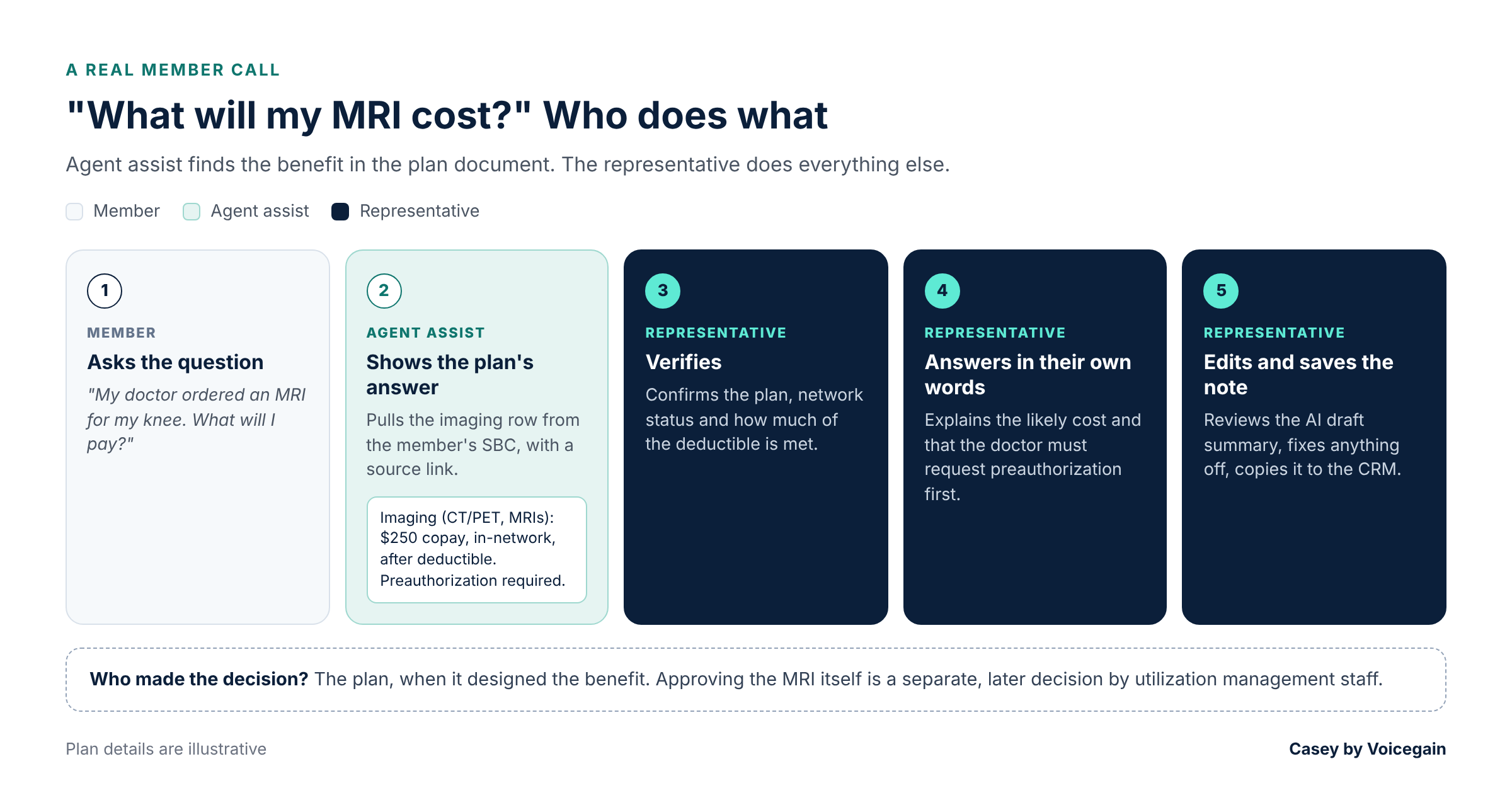
What Agent Assist /Co-Pilot shares: A link to the appropriate imaging section of the member’s SBC with an AI suggested answer
Imaging (CT/PET scans, MRIs): $250 copay per scan at an in-network facility, after deductible. Preauthorization required.
What the representative does: Verifies the plan, whether the imaging center is in network and what portion of the deductible is satisfied. Explains the likely cost, and that the doctor’s office must request preauthorization first.
Who made the decision: The plan, when it designed and contracted with in-network providers of these services. The approval of this MRI prior authorization is a separate issue that is decided by the utilization management staff of the plan later. The AI agent just found a sentence in a document and shared with the human agent so that the human agent can quote the benefits to the member.
Call 2: Specialist Office Visit Benefit and if referral is required
Member- “I want to see a dermatologist. Is a referral required and how much will be charged for the co-pay?
What Agent Assist/ Co-Pilot should present in real-time: The office visit section of the plan document which includes benefits and rules around referrals.
Primary Care Visit: $25 copay. Specialist Visit: $50 Copay. Telehealth: $0. No referral is needed for in-network specialists.
What the representative does: Checks the dermatologist is in-network and answers the referral question.
Who made the decision: Once again, the AI Co-Pilot’s role is only to search the plan’s benefits and present the answer to the human agent with evidence (hyperlinks to relevant plan document section). The Human Agent decides how to convey this to the Member.
Call 3: The After-call Note or Summary
What happens: Agent Assist or Co-Pilot creates an editable summary of the transcript when the call ends. For example, a note that is generated by the AI Co-Pilot may read as follows “A member asked about MRI costs for knee imaging. The representative confirmed the copay after the deductible is $250 in-network, and preauthorization is required. The member will request a provider to submit a request.”
The Agent now can click on Edit and make any modifications that they deem necessary.
What the representative does: Reads the draft summary and corrects any errors such as misheard numbers or missing details. They can then submit a fully approved summary into the CRM/system of record.
Who made the decision: The Human Agent since they review the Note/Summary before updating.
Emphasizing the Human in the Loop
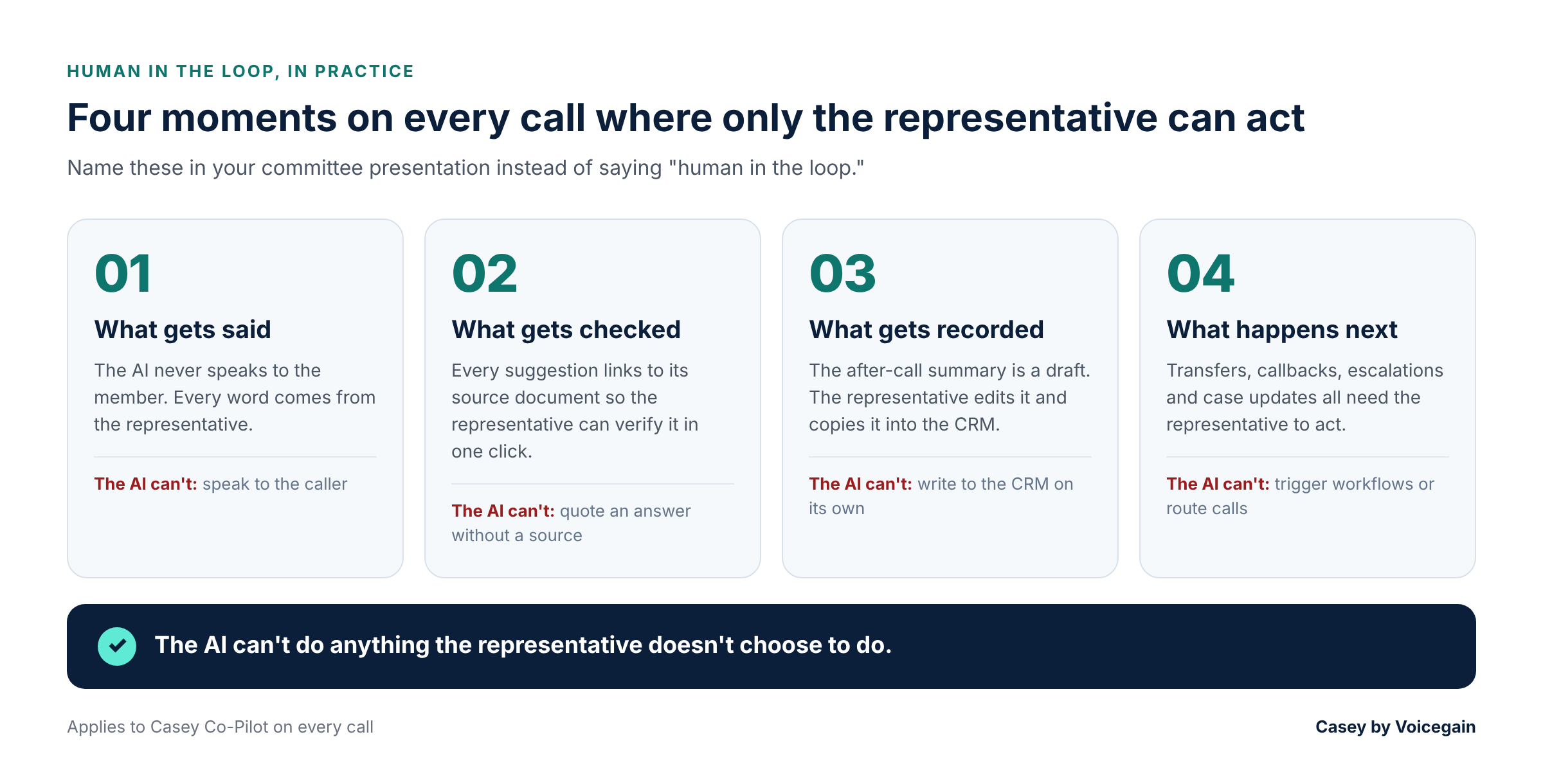
It is important to emphasize “Human in the loop” to the governance committee. You can highlight this by identifying the four moments when the representative alone can take action.
- What gets said. The AI doesn’t speak with the member, the representative does. It’s the human who takes the call according to the member’s situation and plan.
- What gets checked: Suggestions link back to the source document. If it appears to be incorrect, the representative will open the source and check it or ignore the suggestion.
- What is recorded: The after-call summary is a draft. The representative edits it and copies it into the system of record. Nothing goes into the CRM automatically.
- What happens next: The representative must take action on transfers, callbacks, escalation and case updates. The AI does not create workflows or involve call routing.
In summary, highlight to your governance committee that the AI will only do what the representative decides to do. Moreover, a feedback process on the efficacy of AI is included, with thumbs up or thumbs down ratings.
How to Get Your Committee’s Approval
Committees respond well to a clear scope, real-life examples and a straightforward answer about who is in charge.
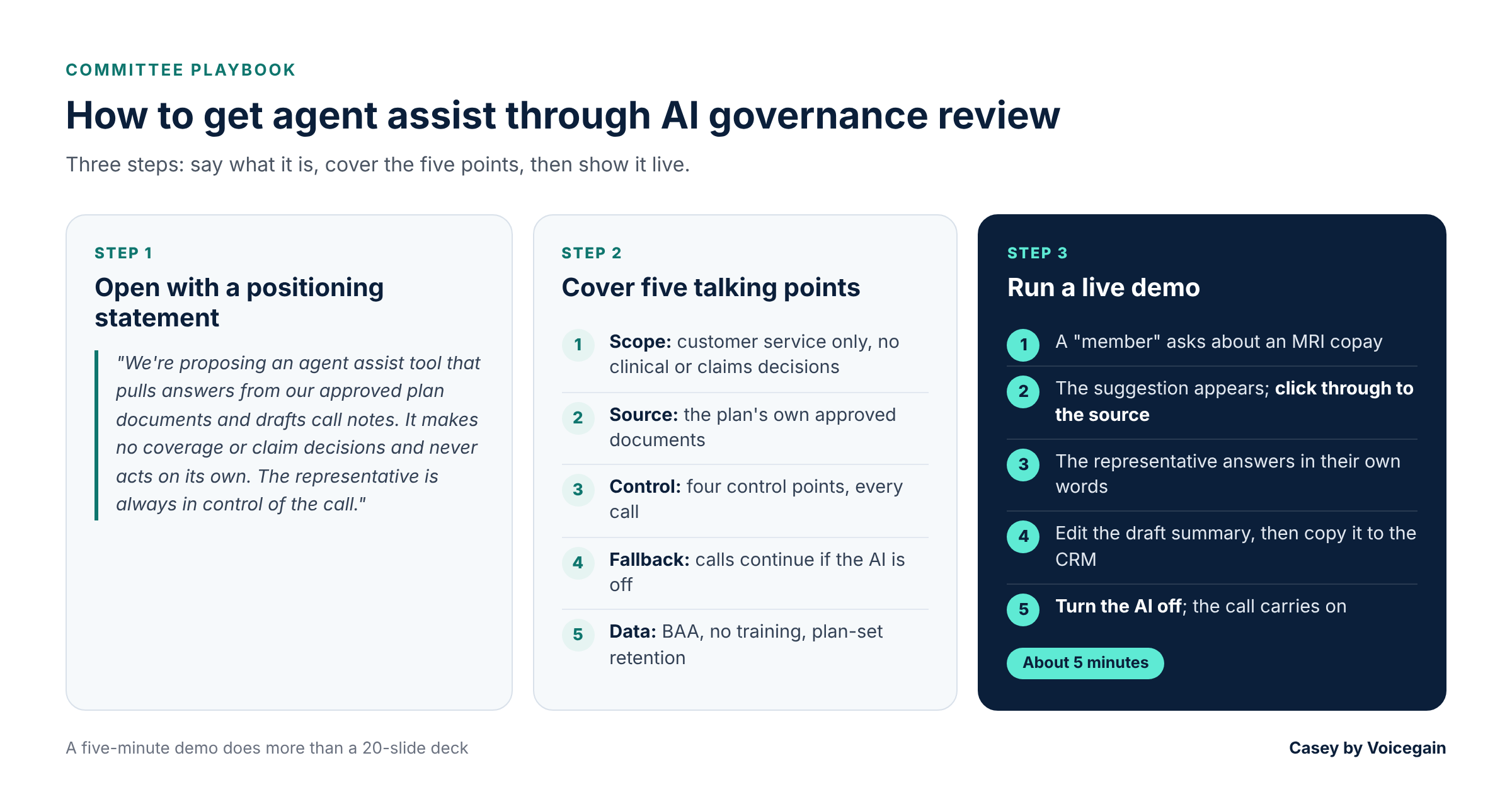
Start with a brief positioning statement. You can use this as is or modify it.
“We’re proposing an Agent Assist tool for member services that pulls answers from our approved plan documents and draft call notes but makes no coverage or claim decision and never does anything on its own - the representative is always in control of the call.”
Next, cover 5 talking points.
- Scope: Customer service only within the scope of operation. No clinical, coverage or claims decisions.
- Source: Answers are derived from the member specific plan documents (such as the SBC) and not the general knowledge of the model.
- Control: The four control points as mentioned above, on every call.
- Fallback: When the AI is off/unavailable, calls continue normally. Representative search and type notes as they do today.
- Data: Signed business associate agreement, no plan data training, retention periods determined by the plan.
You can explain this through a live five-minute demo rather than describing it, which will be more effective than a 20-slide show. Run one mock call:
- A “member” asks about an MRI copay.
- The suggestion appears with its source link. Click through to the plan document.
- The representative answers in their own words.
- The draft summary appears. Make an edit on screen, then copy it into the CRM.
- Turn the AI feature off and show the call carrying on normally.
The last step will solve the dependency question before it is even asked.
Questions to Prepare For
“What if the AI indicates the incorrect copay?”
The suggestion is connected to the source document and the representative can verify in one click. It only uses the plan that has been approved, so it's unlikely that the wrong section will be pulled up, which a trained representative will notice. Now they are looking through long PDFs, and the member is waiting.
“Will representatives simply read out what the AI says?”
Continue to have QA reviews and train representatives to verify the member's plan before quoting a benefit. Thumbs-down ratings also log rejected suggestions.
“But isn't it influencing a decision to suggest an answer?”
No. The member's benefits were decided when the plan was designed. Pointing to the representative where this benefit is written does not change it. The AI would only be influencing a decision if it said "approve" or "deny" something, and it does not.
“What would happen if we turn it off?”
Calls continue. The tool is not integrated with call routing, which means that representatives resort to manual searching and note-taking. Handle times increase and service doesn't cease. You can also switch off each AI feature on its own.
“Does the vendor have the ability to re-use our call data?”
No. Vociegain is contractually prohibited from using any call data to train AI models without prior written consent.
A federal court in California in February 2025 authorized a class action lawsuit against Google for its contact center AI that transcribes calls and provides suggestions to agents. The court looked at whether Google could use call data for its own purposes, not whether it actually did. A subsequent Ninth Circuit decision went in the other direction, and courts have yet to resolve this issue. The safest choice is a vendor with no such rights. As shared above, we guarantee that call data and data from plans will not be used to train models without the plan's written consent. We leverage foundation models like Google's Gemini, which Google pledges not to train on customer data without consent.
“Will our members' PHI be protected?”
Yes. A cloud provider that is handling PHI for a health plan is a business associate and is required to enter into a business associate agreement, according to HHS guidance. Voicegain signs one, and Co-Pilot operates on SOC 2 Type 2 certified infrastructure, with both in-transit and at-rest encryption. The plan sets retention.
"What can it see on a representative's computer?" Very little. IT installs and manages the browser extension via a policy and representatives log on via the plan's single sign-on. Call audio goes straight from the phone platform to our servers, so the extension never uses the microphone or the screen, and it can't read web pages or keystrokes. By default, call data is removed from the browser after 30 seconds of a call.
How Casey Co-Pilot Helps Your Representatives
Casey Co-Pilot is the Agent Assist tool, created for health plan and TPA call centers. When Casey’s AI voice agent transfers a call, the representative sees why the member called and whether HIPAA verification is done, so nobody has to repeat themselves.
During the call, Co-Pilot provides information related to coverage questions, like a copay or a referral rule, that exists in the plan documents. The Co-Pilot guides the representative through checklists. When the call ends, it drafts a call note within seconds for the representative to review.
Published
%401x.png)